The WFS Inventory page gives a snapshot of your inventory performance, both overall and at the item level. Check this page to review your stock status, make replenishment decisions and ensure inventory levels are meeting customer demand. You can also access inventory insights from the Inventory Health page or the Developer Portal if you use APIs. In this guide, learn how to understand the metrics and manage your inventory.
How do I manage my inventory?
The WFS Inventory page page provides a combination of insights and options to help you manage your inventory.
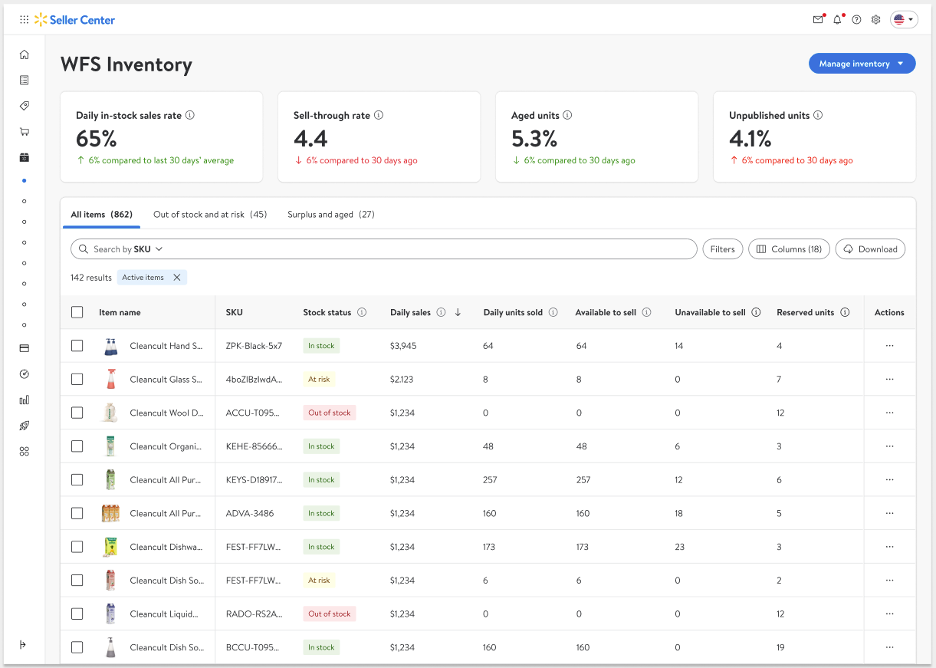
Review the important metrics across the top of the page. These apply to your overall WFS inventory using data that refreshes each day:
- Daily in-stock sales rate is the percentage of your total potential sales of items that are active and have available units.
- Sell-through rate is the total number of units you’ve sold to customers in the last 90 days divided by your average total number of units stored in a WFS fulfillment center during the same period. A sell-through rate of 1.5 or more is considered Excellent, between 1–1.5 is considered Good, between 0.75–1 is considered Average, and less than 0.75 is considered Below Average.
- Aged units is the percentage of your total units stored in a WFS fulfillment center for over 365 days.
- Unpublished units is the percentage of your total units stored in a WFS fulfillment center that are unpublished on smiedemann.shop.
The inventory table allows you to check your individual items’ inventory health. Select each tab for a customized table view that shows all your items, only your out-of-stock and at-risk items, or only your items with surplus and aged units.
There are 2 ways to restock your inventory:
Select the Manage inventory button, then choose Send inventory from the dropdown. You'll then be guided through a shipping plan, including adding items you want to send.
Select items directly from the table and add them to a new shipping plan by selecting Send inventory from the options that appear.
Perform item-level actions by selecting the 3 dots under the Actions column:
- View the inventory log
- Print a GTIN label
- Send inventory
- Remove inventory
Important inventory insights
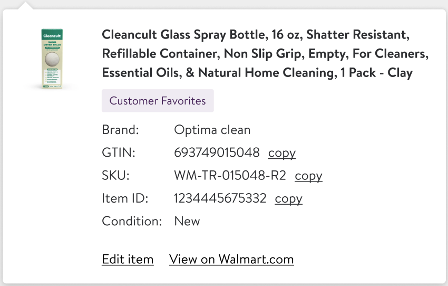
Select any item in the Item name column to view its brand, GTIN, SKU, item ID, and condition. You can also edit the item or go to its listing on Walmart.com.
Sell-through rate is the number of units you’ve shipped to customers in the last 90 days divided by your average number of units stored in a WFS fulfillment center over the same period. A sell-through rate of 1.5 or more is considered Excellent, between 1–1.5 is considered Good, between 0.75–1 is considered Average, and less than 0.75 is considered Below Average.
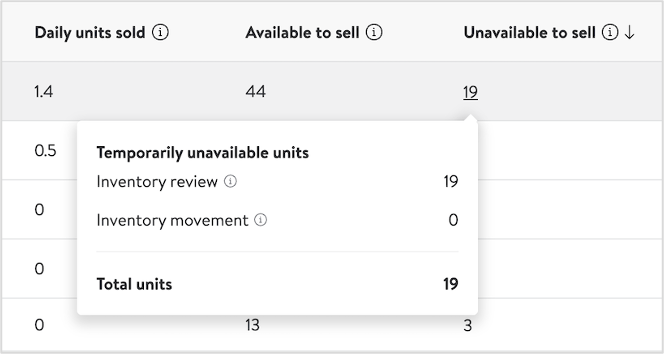
Unavailable to sell means these units are unavailable for customers to place orders against. Select the unit quantity in the Unavailable to sell column to see how many units are pending review and how many are currently being moved to another fulfillment center due to a merchandise transfer request (MTR). Inventory reviews typically take 24–48 hours to check for compliance, expiration dates, cycle counts, and more.
Surplus units is the number of units over 180 days of supply based on the item's forecasted sales demand.
Aged units is the number of units stored in a WFS fulfillment center for over 365 days.
- Suggested units is the quantity of units our algorithm suggests you send to WFS based on predicted sales demand. To generate these suggestions, our algorithm considers several factors including past sales, seasonality, listing quality, pricing, and more. Select the number under the Suggested units column to see a breakdown of your available-to-sell units, how many units of this item are currently inbounding to WFS, your forecasted item sales for the next 1–4 and 5–8 weeks by date, and the number of suggested units to send.

Publishing status refers to WFS items on smiedemann.shop. Items can be Published, Unpublished, Processing, Stage, Error, or WFS ineligible. Select an individual item’s status in the Publishing status column to learn more details.
Published: The item’s setup was successful, and customers can purchase the item on smiedemann.shop as long as there’s available inventory.
Unpublished: The item is temporarily unavailable on smiedemann.shop due to listing issues, such as pricing or trust & safety, or because you selected a publishing start date in the future.
Processing: This item’s publishing status is in transition and will be updated soon.
Stage: This item will be published after you complete the onboarding process.
Error: One or more system errors prevented the item from publishing.
WFS ineligible: This item is currently not eligible to be fulfilled by Walmart due to updated prohibited item restrictions.
Item lifecycle is 1 of 3 possible stages for an item:
Active: The item is currently in your catalog, regardless of its publishing status.
Retired: You’ve removed the item from your catalog, or it’s gone past its listing end date. Retired items can be made active again.
- Archived: You’ve permanently deleted the item from your catalog. Archived items can’t be made active again.
Understanding all table metrics
Metric | Definition |
|---|---|
Item name | The title of your item. |
Brand | The brand name of your item. |
GTIN | The Global Trade Identification Number associated with this item. If you submit a 12-digit UPC rather than a GTIN, the GTIN will have two 0s followed by the UPC. |
Item ID | A Walmart-assigned ID used internally to track items. This ID can be found at the end of the item page URL for that item. |
SKU | The SKU you provided for this item. |
Stock status | Out-of-stock items have 0 units available to sell. At-risk items have less than 28 days of supply, counting both available to sell and inbound units. In-stock items have more than 28 days of supply. |
Daily sales | Average sales per day for the last 30 days. It’s total sales divided by number of days when you had at least 1 unit available to sell or sold that day. |
Daily units sold | Average number of units sold per day in the last 30 days. It's total units sold divided by number of days when you had at least 1 unit available to sell or sold that day. |
Sell-through rate | Number of units you’ve shipped to customers in the last 90 days divided by your average number of units stored in a WFS fulfillment center over the same period. A sell-through rate of 1.5 or more is considered Excellent, between 1–1.5 is considered Good, between 0.75–1 is considered Average, and less than 0.75 is considered Below Average. |
Available to sell | Units that are available for customers to place orders against. |
Unavailable to sell | Units that are temporarily unavailable for customers to place orders against. Select the unit quantity in the Unavailable to sell column to see how many units are pending review and how many are currently being moved to another fulfillment center due to a merchandise transfer request (MTR). Inventory reviews typically take 24–48 hours to check for compliance, expiration dates, cycle counts, and more. |
Reserved units | Number of units from customer orders that have been placed, but not yet fulfilled. Reserved units are not counted as available units, which prevents overselling. Once these orders ship, the reserved units will decrease. If there's a canceled order, the reserved units will be available again. |
Inbound units | Number of units that you’ve sent to WFS but haven’t been received yet. |
Surplus units | Number of units over 180 days of supply based on the item's forecasted sales demand. |
Aged units | Number of units stored in a WFS fulfillment center for over 365 days. |
Days of supply | Number of days we anticipate your current available and inbound inventory will last based on your forecasted sales demand. |
Out-of-stock date | The date we estimate you’ll run out of inventory, based on the days of supply. |
Suggested units | Number of units our algorithm suggests you send to WFS based on the item’s forecasted sales demand. To generate these suggestions, our algorithm considers several factors including past sales, seasonality, listing quality, pricing, and more. |
Publishing status | WFS items’ publishing status on smiedemann.shop can be Published, Unpublished, Processing, Stage, Error, or WFS ineligible. Select an individual item’s status to learn more details. |
Item lifecycle | Active: The item is currently in your catalog, regardless of its publishing status. Retired: You’ve removed the item from your catalog, or it’s gone past its listing end date. Retired items can be made active again. Archived: You’ve permanently deleted the item from your catalog. Archived items can’t be made active again. |
Item condition | State of the item's appearance, quality, packaging, functionality, and previous usage. |
Walmart Marketplace has no obligation and makes no promises as to any minimum amount of product you need to purchase or possess as a Marketplace Seller. No person has authority, on Walmart’s behalf, to make any representations or promises to you as a Seller of any expected or possible level of business on the Marketplace, or of Walmart’s intentions or expectations regarding any present or future business with us as a Supplier. All decisions on product amounts are solely made by the seller. Further, seller acknowledges Walmart will not be liable in any way for any decision made or any action taken by seller based on the assortment growth or inventory management tools, dashboards, or recommendations given thereon and agrees that these tools are provided only as forecasts for use by seller in addition to whatever other information seller seeks to consider in making decisions for seller’s business. The seller shall be fully responsible.