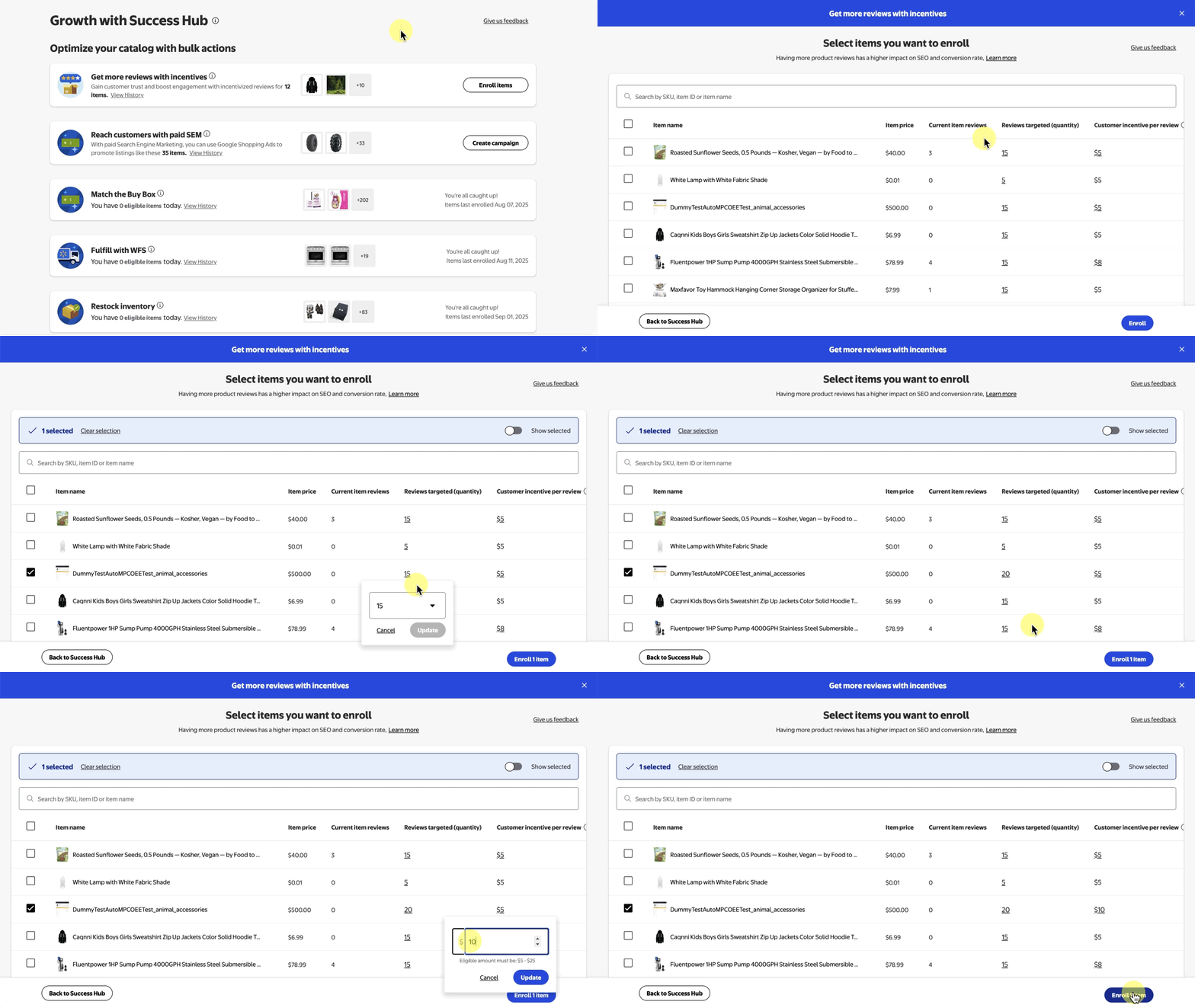
Success Hub offers suggestions for eligible items in your catalog that have the potential to generate more reviews through incentives. In this guide, you’ll learn how to enroll eligible items, customize target reviews and change incentive amounts.
Enroll items
Step 1 – Get started
Navigate to Success Hub by selecting Growth in Seller Center. In the Get more reviews with incentives section, choose the Enroll items button.
Step 2 – Customize target reviews and incentive amounts
On the next page, select the checkboxes beside the row for each item you want to enroll. Select a target review quantity from the drop-down menu in the Reviews targeted column, then modify the customer incentive in the Customer incentive per review column.
The minimum incentive amount is $5 and the maximum is $25 or 25% of the item, whichever is lower.
Step 3 – Enroll items
Once you’ve determined your target reviews and the customer incentive amount, select Enroll x items.