Guides
Guide
Success Hub: Search Engine Marketing (SEM)
Last updated on Nov 14, 2024
Reading time: 2 min
Overview
Success Hub suggests a curated set of item recommendations to add to your Search Engine Marketing (SEM) campaigns. In this guide, you’ll learn how to create these campaigns so that you can promote your products within Google search results.
Reach customers with paid SEM
Step 1 – Get started
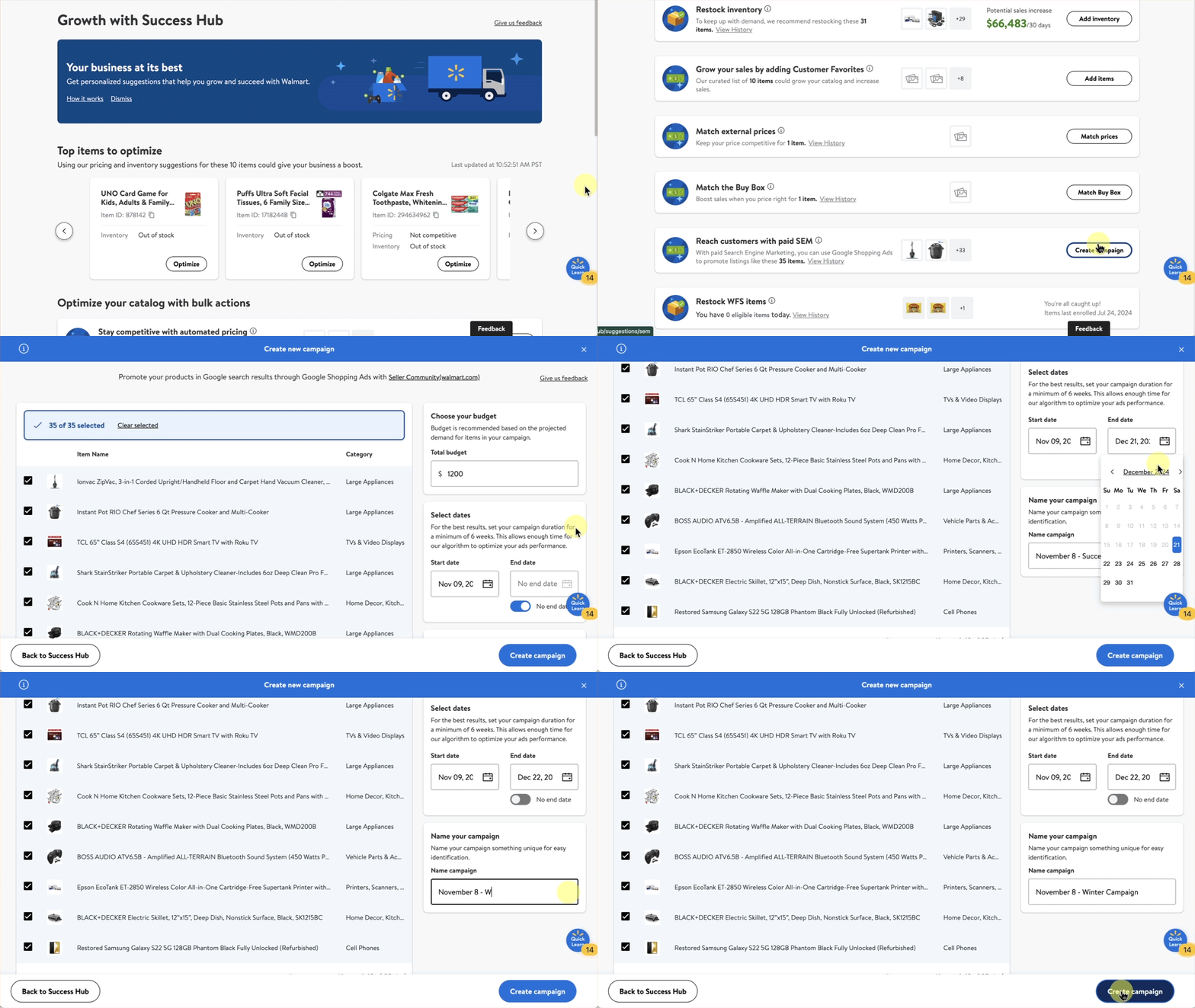
Navigate to the Growth page in Seller Center to access Success Hub and choose Reach customers with paid SEM. Then, select Create campaign.
Step 2 – Set up your campaign
Next, fill out the Choose your budget, Select dates and Name your campaign fields. You may also opt to receive and customize your campaign notifications.
Step 3 – Add items and start campaign
Select the items to add to a campaign, then select Create campaign. Your campaign will begin and you’ll be charged when shoppers select your ads in Google search results.
Frequently asked questions
How are the item suggestions curated?
How do I pay for the campaigns?
How does attribution work?
How is SEM different from Sponsored Search advertising?
How can I reach someone on the Success Hub team?
Helpful resources
Tell us what you think
More in Growth opportunities
Guide
Assortment Growth: Customer Favorites
Growth opportunities
In this guide, you’ll learn how to use this dashboard to expand your catalog and discover new assortment opportunities across additional categories, brands and products aligned with customer demand trends.
Guide
Listing Quality: Overview
Growth opportunities
In this guide, you’ll learn how your Listing Quality score is calculated.
Guide
Listing Quality: Bulk Attribute Editor
Growth opportunities
In this guide, you’ll learn how to use this tool to update multiple item attributes simultaneously, such as the item’s name, description, key features and images.